
Tinkerwell Alternative : If you’re a PHP developer, you’ve probably heard of Tinkerwell, a popular tool for running and testing PHP code. While it’s powerful, it does come with a price, which may not suit everyone, especially if you’re looking for a free and open-source alternative. That’s where TweakPHP comes in—a promising new project that’s currently in its early stages but aims to offer a similar experience, all while being completely open-source.
In this article, we’ll take a closer look at TweakPHP, what it offers, and why it’s shaping up to be a solid option for developers who need a free and open-source tool similar to Tinkerwell.
What is TweakPHP?
TweakPHP is a desktop app built with Vue.js and Electron, designed specifically for PHP developers. It’s a lightweight code editor that lets you run and tweak your PHP code, especially within Laravel projects.
One of its key features is the use of Microsoft’s Monaco Editor, the same editor that powers Visual Studio Code. This means TweakPHP comes with a great-looking interface and useful coding tools like syntax highlighting and auto-completion. These features make it easier and quicker to write and test PHP code, without the extra load of heavier development tools like PHPStorm or Visual Studio Code.
Key Features of TweakPHP
Though still inalpha development, TweakPHP already offers a strong set of features that make it a great free alternative to Tinkerwell. Here are some of the highlights:
- Laravel Support
Just like Tinkerwell, TweakPHP is built with Laravel developers in mind. You can open your Laravel project inside TweakPHP and run your PHP code in that environment. This is great for testing code snippets, debugging, or experimenting with parts of your project.
- Multiple Project Support with Tabs
TweakPHP allows you to open multiple projects at the same time, each in its own tab. This makes it easy to switch between different projects without closing and reopening them, providing a smoother workflow for developers who work on several projects simultaneously.
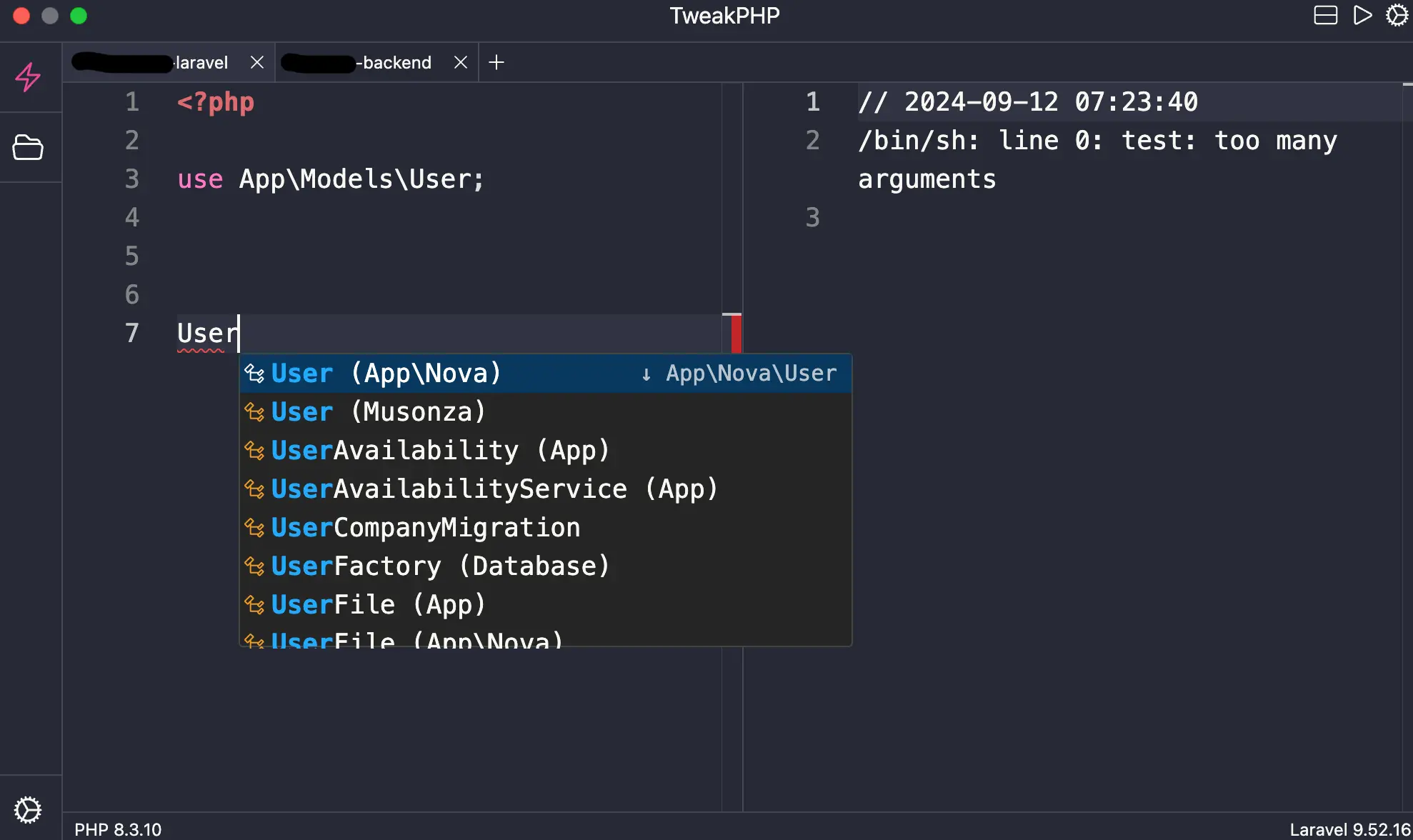
- Monaco Editor
TweakPHP uses the Monaco Editor, known for its clean design and helpful coding tools. You get features like code auto-completion and syntax highlighting, making it easier to write and test your code.
- Cross-Platform Availability
Since TweakPHP is built on Electron, it works on Windows, Mac, and Linux. This makes it accessible to developers regardless of what operating system they prefer.
- Easy Setup (For now as it is under development)
Getting TweakPHP running on your computer is quick and straightforward. After cloning the project from GitHub, you just need to run a few simple commands to get it up and running:
git clone https://github.com/tweakphp/tweakphp.git
cd tweakphp
npm install
cp .env.dist .env
npm run dev- Open-Source and Free
The biggest advantage of TweakPHP over Tinkerwell is that it’s completely open-source. The code is available on GitHub for anyone to use, contribute to, or customize. For developers seeking a free alternative to Tinkerwell, TweakPHP is a great option, and you have full control over how you use it.
What’s Coming Next: The Roadmap
Even though TweakPHP is still in its early stages, the development team has exciting plans for the future. Here are some of the features they’re working on:
- Symfony Loader: While TweakPHP currently supports Composer, the team is planning to add a dedicated Symfony Loader. This will make it easier to run Symfony applications, similar to how it currently works with Laravel.
- WordPress Loader: Another feature in the works is support for WordPress. This will allow WordPress developers to quickly execute and test their PHP code within the WordPress environment.
- Built-in Laravel: There are plans to simplify the Laravel setup even further by making it a built-in feature.
- SSH Code Execution: One of the more advanced features coming soon is the ability to run PHP code on remote servers via SSH.
- Docker Integration: TweakPHP will also introduce support for Docker, allowing you to run your code inside isolated environments, which is useful for testing in different setups.
- Cross-platform Builds: The team is working on creating native builds for Mac, which will make the app even easier to use on different operating systems.
Why You Should Try TweakPHP
Although TweakPHP is still in alpha, it’s already showing great potential as a free and open-source alternative to Tinkerwell. Its use of well-established tools like Vue.js, Electron, and Monaco Editor provides a strong base for a tool that’s lightweight, easy to use, and highly customizable.
For PHP and Laravel developers, it’s definitely worth trying out—whether you’re testing code snippets or working on larger projects. And because it’s open-source, you can also contribute to its development or suggest features you’d like to see in future updates.
How to Get Involved
If you want to contribute to the project, TweakPHP is hosted on GitHub here. Whether you’re fixing bugs, adding new features, or simply providing feedback, every contribution helps the project grow and improve.
Final Thoughts
If you’re looking for a free and open-source alternative to Tinkerwell, TweakPHP is definitely worth checking out. With its user-friendly interface, built-in Laravel support, and promising roadmap, it offers a solid alternative for PHP developers who need a reliable tool for running and tweaking their code.
As it continues to evolve, TweakPHP could become a go-to tool for the PHP community. Try it out today and see if it fits into your workflow!